How to use IG Downloader: Save Instagram Media easily
Wondering how to save photos and videos from Instagram to your device? This is a common challenge for many users who want to keep their favorite memories offline. In this comprehensive guide, we will show you how to use our platform to download any Instagram content quickly and securely.
Our tool simplifies the process of saving Instagram Reels, Stories, Photos, and IGTV videos in high definition. Enjoy the convenience of downloading media directly from your web browser without the need for additional software. We support all modern devices and prioritize 4K quality for the best viewing experience, ensuring your downloads remain crisp and clear.
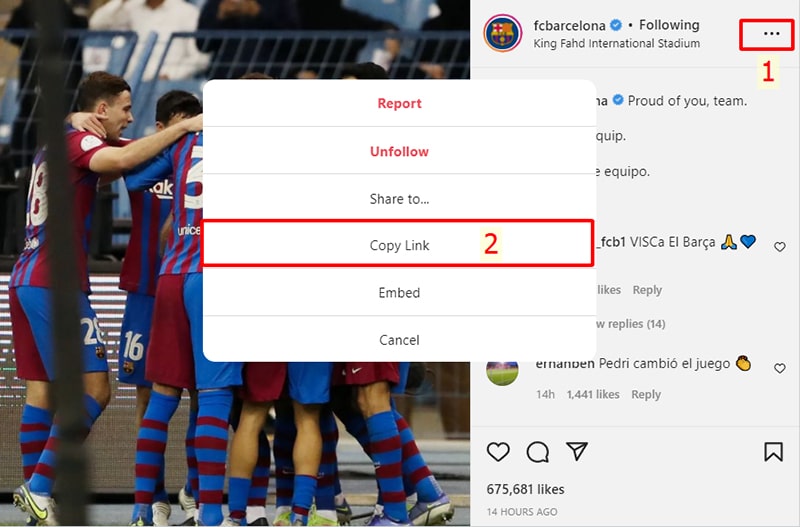
Step 1: Copy Instagram Link
Find the photo or video you want to save, tap the (...) icon, and select Copy Link.
Step 2: Paste the link into IG Downloader
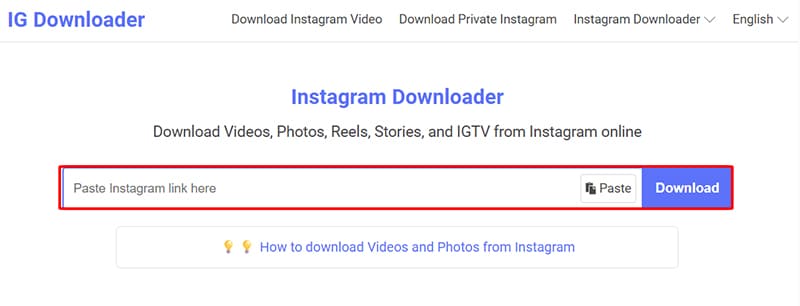
- Go to IG-Downloader.to using your web browser.
- Paste the link into the search box and press the Download button.
Step 3: Save to your device
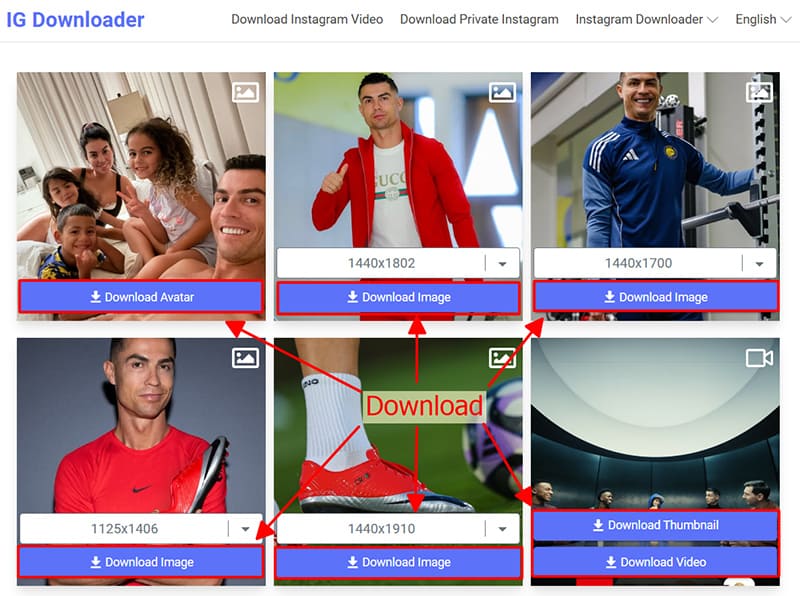
- The file is ready. Click the Download Photo or Download Video button below the content to save it.
Note
- Encountered an error or can't find your content? Use our Private Downloader: https://ig-downloader.to/en/instagram-private-downloader. This specialized tool will help you access and save private Instagram photos and videos securely.
If you encounter any issues during use, please feel free to contact us for immediate support. We are always here to help!